
1 November 2026
AI blast radius: what breaks when payments-risk goes down
When one system fails, which AI assistants fail with it? We measure the AI blast radius on a realistic estate and show why a gateway turns a stressful guess into a quick lookup.
By MCP Connect
When one system goes down, which AI assistants go with it?
Every AI assistant you connect to a business system adds a dependency, and most organisations could not list theirs today. When the payments platform fails at 2 a.m., the on-call engineer needs one answer quickly: which assistants, which tools and which teams are affected?
If each assistant was wired to each system on its own, that answer is spread across config files, notebooks and vendor consoles. We call the answer the AI blast radius: every assistant, tool and workflow that loses capability when one system becomes unreachable.
This article measures that blast radius on a realistic estate, using the MCP Connect example environment, and shows why a gateway turns a stressful guess into a quick lookup.
The example environment: nine systems, six assistants
The example environment models an enterprise e-commerce retailer. It connects nine business and operations systems to the gateway, from order management and inventory to IBM Instana and DBmarlin for observability.
It doesn't hand those systems to AI clients directly. Instead, each team gets a virtual server: a curated set of tools, published as a single MCP endpoint for that team's assistant.
| Assistant (virtual server) | Who uses it | Systems it draws on | Tools |
|---|---|---|---|
| Customer Service Copilot | Contact-centre agents | order-management, fulfilment, customer-service, knowledge-base | 11 |
| Payments and Risk | The risk desk | payments-risk, order-management | 7 |
| Merchandising Assistant | Merchandisers | product-catalog, inventory | 6 |
| Fulfilment Ops | The operations centre | fulfilment, inventory | 6 |
| SRE Copilot | On-call engineers | ibm-instana, dbmarlin, order-management | 21 |
| Executive Briefing | Leadership | order-management, inventory, fulfilment | 10 |
The system this article is about, payments-risk, holds payments, fraud scores and chargebacks.
Reading the dependency map
The MCP Connect home page draws the whole estate as one dependency map: assistants on the left, the gateway and its guardrails in the middle, connected systems on the right. Select any node and the map traces its dependencies and dims everything else.
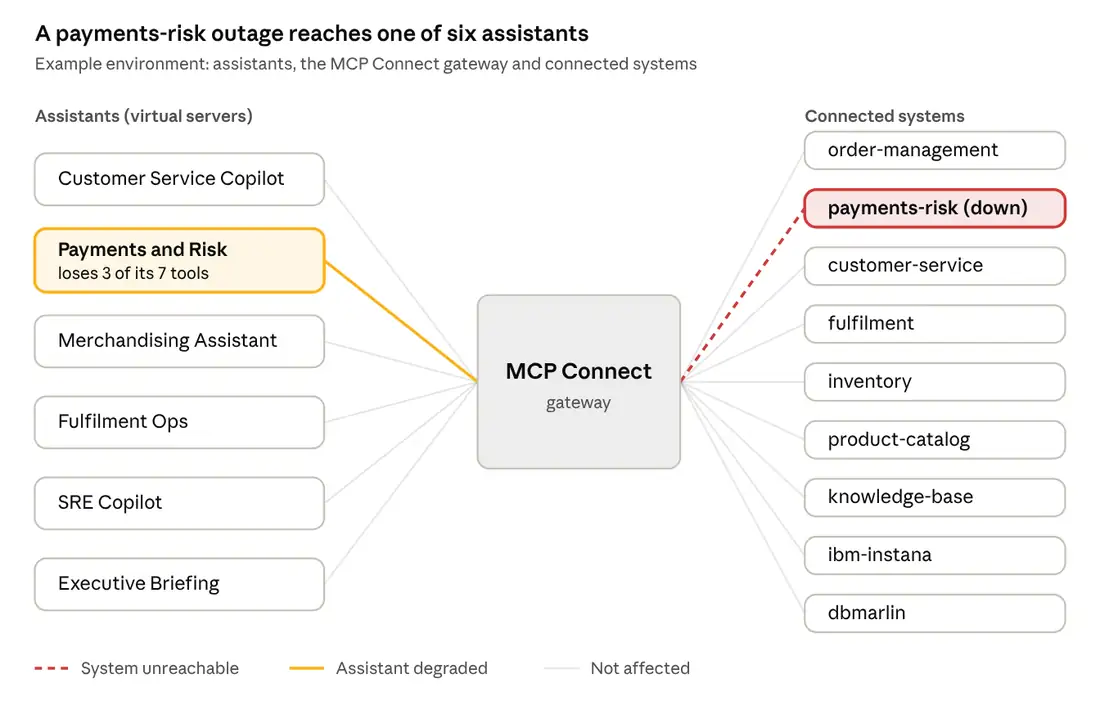
Dependency map, simplified: payments-risk shown as unreachable.
Select payments-risk and a single line lights up, through the gateway to the Payments and Risk assistant. The other five assistants and eight systems stay dimmed: they don't depend on payments-risk at all.
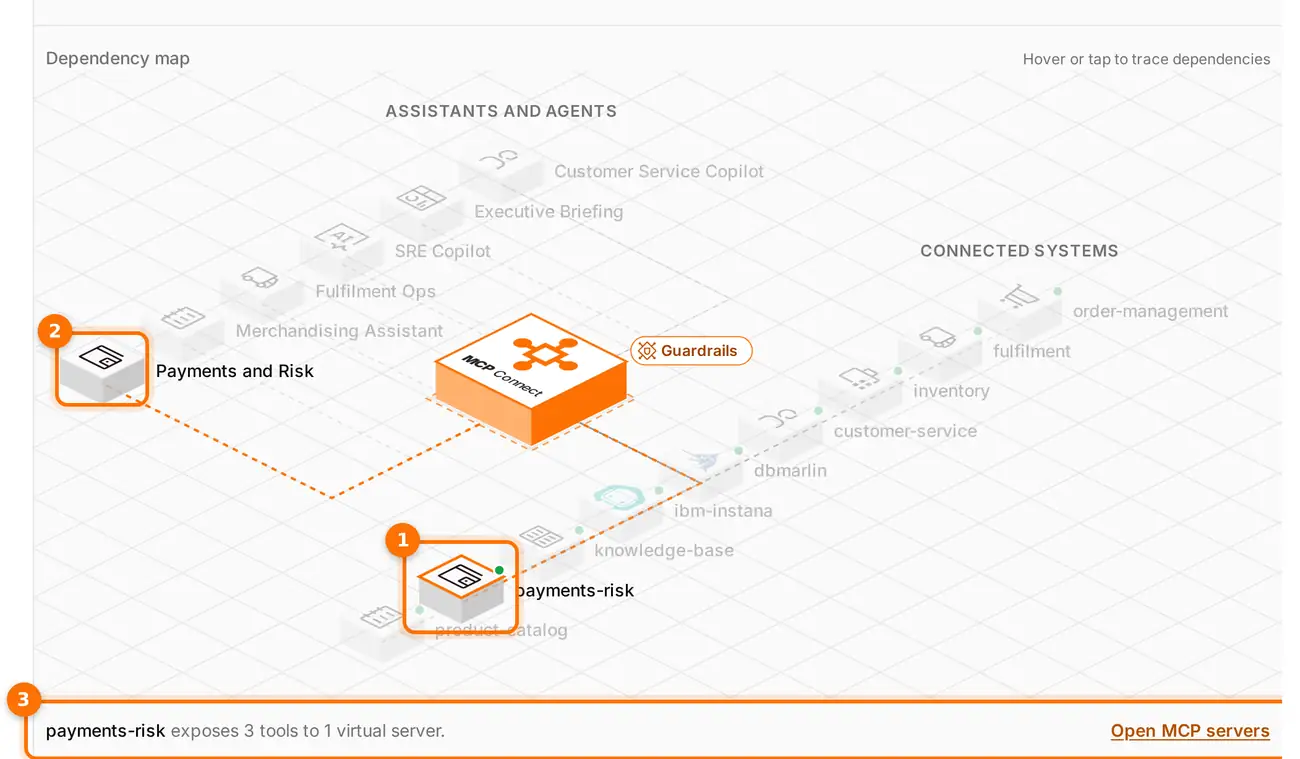
(1) payments-risk is selected. (2) Its only dependant, the Payments and Risk virtual server, lights up; everything else is dimmed. (3) The details line confirms it: payments-risk exposes 3 tools to 1 virtual server.
What actually breaks: one assistant, three tools
When payments-risk goes down, one of the six assistants is affected: Payments and Risk. It loses three of its seven tools:
get_fraud_score: the fraud score for an order or paymentget_payment: the payment recordlist_chargebacks: open chargeback cases
The other five assistants don't draw on payments-risk at all, so contact-centre agents, merchandisers, the operations centre, on-call engineers and leadership can carry on as normal.
The more important finding is what Payments and Risk keeps. Its four order-management tools still work, including issue_refund. During the outage, the risk desk's assistant can still issue a refund, but it can no longer check the fraud score first.
A total outage is easy to notice. A half-working assistant that skips a control is the outcome to plan for. Once you can see the blast radius, the response is obvious: take the refund tool out of that virtual server until payments-risk recovers, and have the risk desk handle refunds by hand.
Why a gateway makes the blast radius visible and containable
The example environment answers the 2 a.m. question in seconds because every assistant reaches every system through one gateway. That design gives three things that point-to-point wiring can't.
The dependencies are written down. Each virtual server lists the tools it exposes, and each tool belongs to one system. The dependency map is drawn from that record, not from a diagram someone has to remember to update.
The radius is small by design. Each team gets only the tools its job needs, so an outage reaches only the assistants that genuinely depend on that system. If every team had been handed every system, a payments-risk outage would have reached all six assistants.
There is one place to act. When payments-risk fails, the fix happens once, on the gateway. You can remove issue_refund from the Payments and Risk virtual server. Every client using that endpoint loses the tool at once, no AI tool's configuration changes, and the other virtual servers that include it, such as the Customer Service Copilot, keep it.
Measure your own AI blast radius
Run these five checks before your next outage, not during it:
- List every system an AI assistant can reach, and through which endpoint.
- For each system, list the assistants and tools that depend on it.
- Find the partial failures: tools that still work when a related control, such as a fraud check or an approval step, has gone down.
- Decide what happens to each of those tools during an outage: keep it, pause it, or route it to a person.
- Make sure on-call staff can see this map without asking the team that built the integrations.
If step 1 takes more than a few minutes, your assistants are probably wired point to point, and the blast radius is a guess.
Try the interactive demo and select payments-risk on the dependency map to see this article's example for yourself.