
1 November 2026
Guardrails in the data path: how MCP Connect plugins work
Put guardrails where every call passes. How MCP Connect plugins run in the data path, what the library covers, how you control their behaviour and how to see them act.
By MCP Connect
Put guardrails where every call passes
If every AI assistant has its own guardrails, you end up with as many policies as assistants, each a little different, and each one has to be kept up to date. If every assistant reaches your systems through one gateway, the guardrail can sit there instead: written once, applied to every call, whichever AI client or model is behind it.
In MCP Connect, guardrails are plugins in the data path. This article explains where they run, what the library covers, how you control their behaviour, and how to see them act, using the MCP Connect example environment.
Hooks: where a plugin runs
A plugin attaches to one or more hooks, fixed points in the life of a request. The ones that matter most for AI traffic:
| Hook | Runs | Typical use |
|---|---|---|
tool_pre_invoke | Before a tool call is forwarded | Validate arguments, block dangerous operations, apply rate limits |
tool_post_invoke | After the tool returns, before the assistant sees the result | Mask PII, filter or reshape the result |
prompt_pre_fetch / prompt_post_fetch | Around prompt template retrieval and rendering | Scan arguments, filter rendered content |
resource_pre_fetch / resource_post_fetch | Around resource reads | Validate URIs, redact sensitive content |
agent_pre_invoke / agent_post_invoke | Around calls to A2A agents | Filter messages, moderate responses |
http_auth_resolve_user / http_auth_check_permission | During authentication and permission checks | Plug in a custom identity or permission source |
The PII filter in the example environment, for instance, attaches to four hooks: before and after prompts, and before and after tool calls.
The plugin library, by job
The example environment lists 44 plugins on its Plugins page. Grouped by what they do:
| Job | Plugins |
|---|---|
| Protect data | PIIFilter, PIIFilterPlugin, SecretsDetection, EncodedExfilDetector |
| Check content | ContentModeration, HarmfulContentDetector, DenyListPlugin, ReplaceBadWordsPlugin |
| Check inputs | SQLSanitizer, SchemaGuardPlugin, ArgumentNormalizer, SPARCStaticValidator |
| Check links and files | URLReputationPlugin, VirusTotalURLCheckerPlugin, FileTypeAllowlistPlugin, SafeHTMLSanitizer |
| Control access | UnifiedPDPPlugin, JwtClaimsExtractionPlugin, VaultPlugin |
| Keep things reliable | RateLimiterPlugin, CircuitBreaker, RetryWithBackoffPlugin, Watchdog, OutputLengthGuardPlugin |
| Observe | ToolsTelemetryExporter, SpanAttributeCustomizer, WebhookNotification |
The rest reshape results, for example by repairing JSON, converting HTML to Markdown, caching tool results or summarising long text. Plugins can run inside the gateway or as external services that the gateway calls.
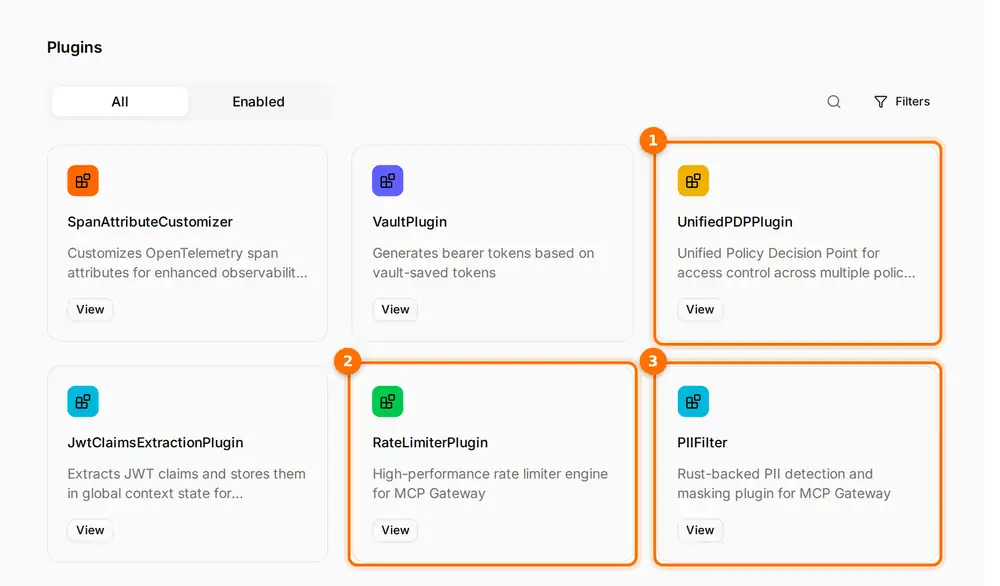
(1) UnifiedPDPPlugin, a policy decision point for access control. (2) RateLimiterPlugin. (3) PIIFilter, for PII detection and masking.
Modes, order and targeting
Mode decides what happens on a violation. Each plugin runs in one of these modes:
| Mode | On a violation |
|---|---|
enforce | Blocks the request |
enforce_ignore_error | Blocks violations, but lets a request through if the plugin itself fails |
permissive | Logs the violation and lets the request continue |
disabled | The plugin is loaded but never runs |
Priority decides the order. Plugins run in ascending priority, so a lower number runs first. Plugins with the same priority can run in parallel if you switch that on.
Conditions decide where. A plugin can be limited to specific virtual servers, tools, prompts, resource URIs or user patterns. A strict PII filter can cover the Customer Service Copilot without applying to the SRE Copilot.
In the example environment, the PII filter runs in enforce mode at priority 50.
Seeing guardrails act
A guardrail that acts silently is hard to trust and hard to tune. In MCP Connect, guardrail actions appear in the activity feed as warnings, so you can filter for them and see exactly what was changed or stopped.
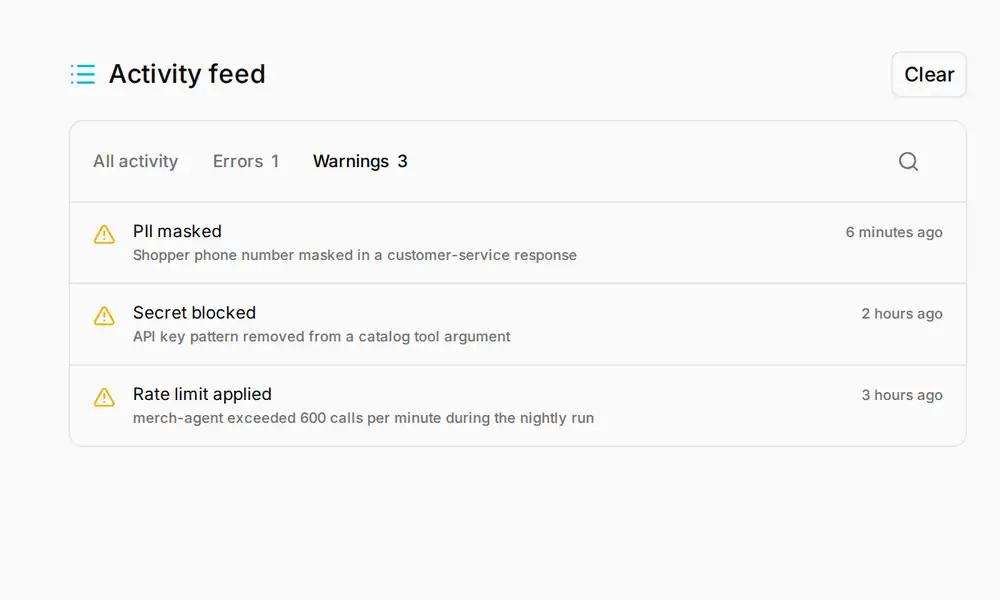
The Warnings filter in the example environment's activity feed: a masked phone number, an API key pattern removed from a tool argument, and an agent held back by a rate limit.
With export to a SIEM switched on, the gateway also sends its security, auth and audit events to your security monitoring.
Rolling guardrails out
- Start a new plugin in
permissivemode, so it logs violations without blocking anything. - Watch the activity feed for a while and tune the plugin's settings until the warnings are the ones you expect.
- Limit it with conditions to the virtual servers and tools it is meant for.
- Switch it to
enforce. - Set priorities so cheap checks, such as rate limits, run before expensive ones.
Open the interactive demo to browse the plugin library and the activity feed's warnings.