
1 November 2026
Least privilege for AI: one virtual server per team
An AI assistant can only misuse a tool it can see. We show how one virtual server per team keeps each assistant to the tools its team needs, and check with evidence whether the contact-centre copilot can reach payment data.
By MCP Connect
Every assistant should see only what its team needs
An AI assistant can only misuse a tool it can see. In MCP Connect, each team's assistant connects to its own virtual server: one MCP endpoint that carries only the tools that team needs, and nothing else.
This article walks through the controls behind that, using the MCP Connect example environment: five teams, nine connected systems and six virtual servers. The question we want to answer with evidence, not assurances, is simple: can the contact-centre copilot reach payment data?
Four controls that work together
1. Every connected system has an owning team. In the example, Payments and Risk owns the payments-risk server, and Merchandising owns product-catalog and inventory.
2. Every system has a visibility level. payments-risk is visible to its own team only. Shared services such as order-management and knowledge-base are public, so other teams can build on them.
3. Every assistant gets a virtual server. A virtual server bundles specific tools into one MCP endpoint. The Customer Service Copilot's bundle holds 11 tools from four systems: order-management, fulfilment, customer-service and knowledge-base. Nothing from payments-risk is in it, so no prompt can reach a fraud score or a payment record through it.
4. Every token belongs to a team. API tokens are issued to a team and can be scoped to a single virtual server. If the person behind a token leaves that team, the gateway rejects the token.
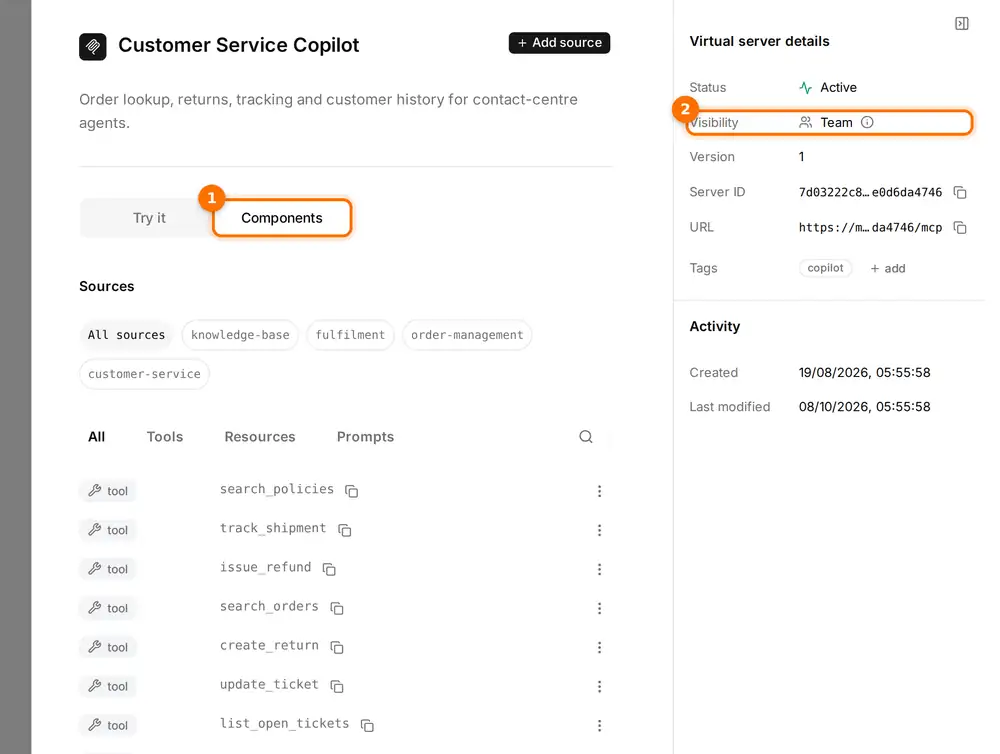
(1) The Components tab lists exactly what the Customer Service Copilot can call, grouped by source system. (2) The virtual server itself is visible to its team only.
Changing a bundle is a single edit on the gateway. The activity feed records each change, for example "Added create_return to Customer Service Copilot", along with who made it.
Proving it on the dependency map
The home page's dependency map is drawn from the gateway's configuration, so it shows what an assistant can actually reach. Select the Customer Service Copilot and four systems light up; payments-risk stays dimmed.
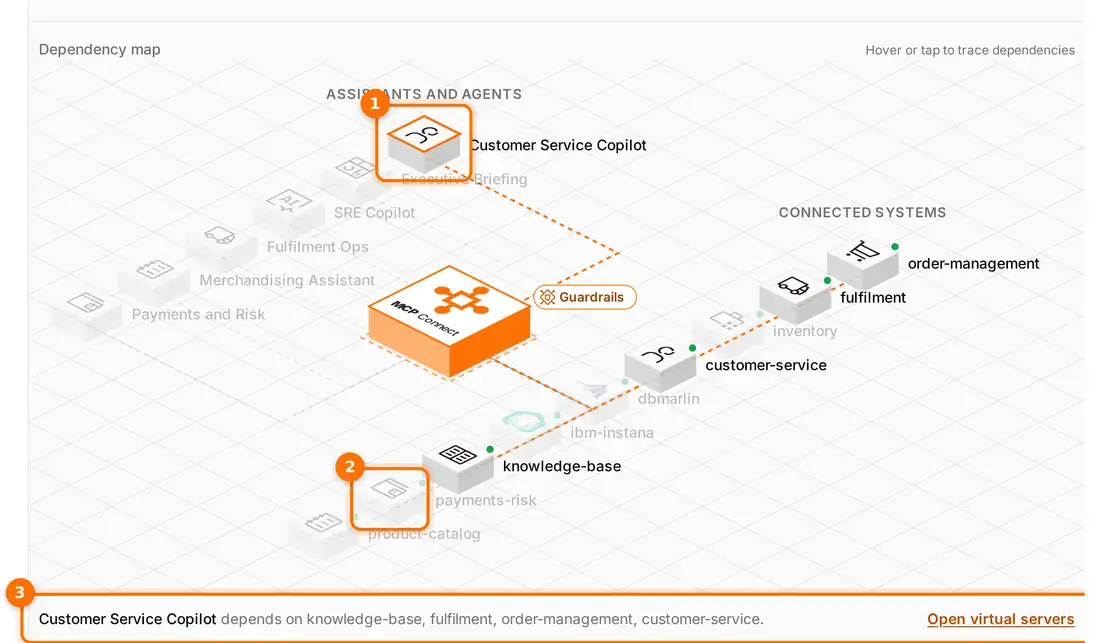
(1) The Customer Service Copilot is selected. (2) payments-risk stays dimmed: no path runs to it. (3) The details line lists every system the copilot depends on.
That is the answer to our question, and it is one an auditor can check for themselves: the contact-centre copilot has no route to payment data. Select payments-risk instead and only one virtual server lights up, Payments and Risk.
Auditing the tools that change data
Least privilege is a review you keep doing, not a one-off setting. Because every bundle lives on the gateway, you can list every tool that changes data and see exactly which assistants hold it. In the example environment, five tools change data, judging by their names:
| Tool | System | Virtual servers that include it |
|---|---|---|
issue_refund | order-management | Customer Service Copilot, Payments and Risk, SRE Copilot, Executive Briefing |
create_return | order-management | Customer Service Copilot, Payments and Risk, SRE Copilot, Executive Briefing |
book_pickup | fulfilment | Customer Service Copilot, Fulfilment Ops, Executive Briefing |
reserve_stock | inventory | Merchandising Assistant, Fulfilment Ops, Executive Briefing |
update_ticket | customer-service | Customer Service Copilot |
A review like this raises fair questions. Should an on-call engineer's copilot issue refunds? Should a leadership briefing reserve stock? The gateway doesn't answer them for you, but it puts every answer in one place, and fixing one is a single edit to that virtual server.
A least-privilege checklist
- Give every connected system an owning team.
- Make sensitive systems visible to their team only; make shared services public deliberately.
- Give each use case its own virtual server, holding only the tools it needs.
- Issue tokens to a team, and scope them to a single virtual server where you can.
- Review the tools that change data, and who holds them, on a regular schedule.
Open the interactive demo, select the Customer Service Copilot on the dependency map, and check for yourself that payments-risk stays dark.