
1 November 2026
An SRE copilot with IBM Instana and DBmarlin, through one gateway
When checkout slows down at night, on-call engineers need application and database context together. The SRE Copilot brings IBM Instana and DBmarlin into one assistant, each connected to the gateway once.
By MCP Connect
Application and database context in one assistant
When checkout slows down at night, the on-call engineer needs answers from two places: application monitoring, to see which service and endpoint are affected, and database monitoring, to see which query is behind it. Usually that means two consoles, two logins and a lot of copying between them.
In the MCP Connect example environment, the SRE Copilot brings both into one assistant. It uses IBM Instana for application, website and infrastructure observability, and DBmarlin for database performance, each connected to the gateway once.
What is in the SRE Copilot
The SRE Copilot is a virtual server owned by Platform Engineering and visible to that team only. Its bundle holds 21 tools from three systems:
| System | Tools | Examples |
|---|---|---|
| IBM Instana | 11 | manage_applications, manage_events, manage_slo, manage_releases, manage_synthetics |
| DBmarlin | 6 | get_top_sql, get_wait_events, get_execution_plan, compare_periods, list_recent_changes |
| order-management | 4 | get_order, search_orders, create_return, issue_refund |
The IBM Instana tools are the 11 that the Instana MCP server publishes. The DBmarlin tool names in the example are illustrative; your DBmarlin endpoint publishes its own.
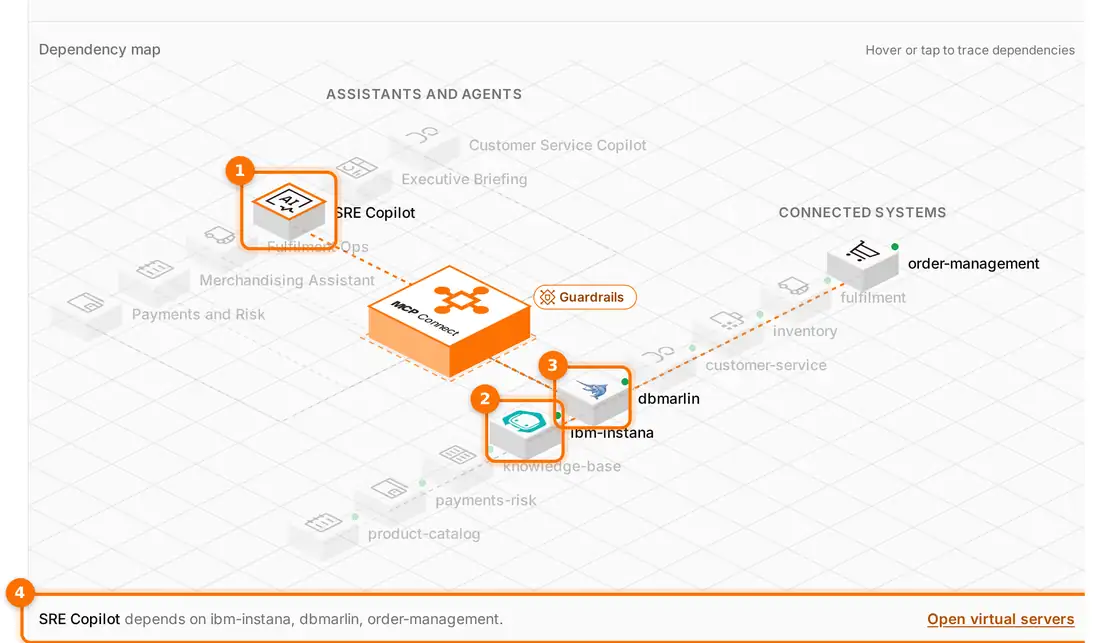
(1) The SRE Copilot is selected on the dependency map. (2) IBM Instana and (3) DBmarlin light up as its dependencies. (4) The details line names all three systems it depends on: ibm-instana, dbmarlin and order-management.
Connecting IBM Instana once
IBM Instana and DBmarlin are both in the MCP Connect server catalog, under Observability. Both are self-hosted, so you point each entry at your own endpoint when you add it.
For Instana, the gateway then sends two custom headers on every call: instana-base-url, for your Instana tenant, and instana-api-token. They are stored with the registration on the gateway. The Instana API token is never handed out to engineers' AI clients or kept in their configuration.
Once the server is registered, MCP Connect discovers its tools and their input schemas. Nobody configures the 11 Instana tools by hand.
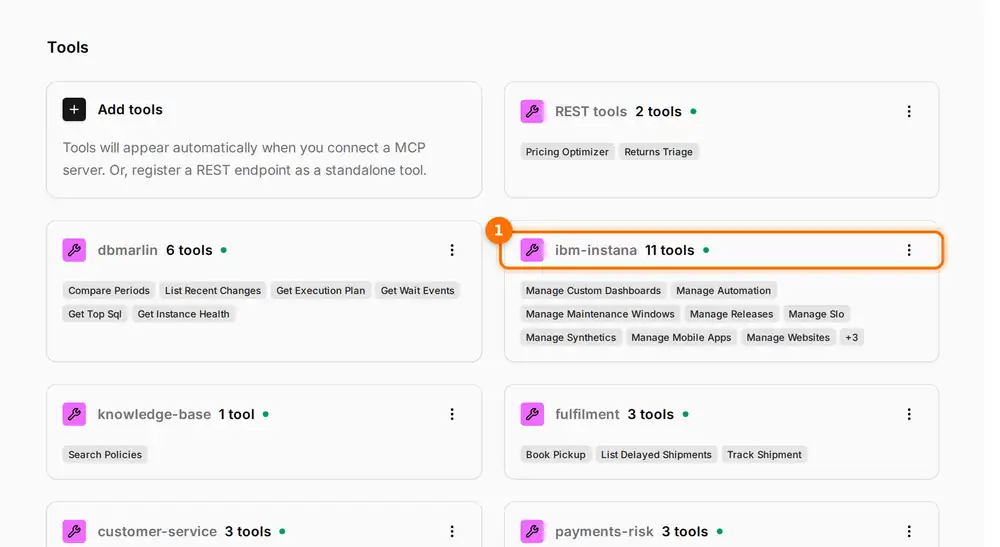
(1) IBM Instana's 11 tools, discovered from its MCP server and grouped under it on the Tools page.
The platform team then chooses which of those tools go into which virtual server. Here, all 11 go to the SRE Copilot and none go to the business teams' assistants.
An investigation, question by question
With both systems in one bundle, the engineer can work through an incident in plain language, and the copilot picks the tool for each question:
| The engineer asks | Tool | System |
|---|---|---|
| Is the checkout-availability SLO burning? | manage_slo | IBM Instana |
| Any open events or recent releases? | manage_events, manage_releases | IBM Instana |
| Which queries are taking the most time on orders-pg-prod? | get_top_sql | DBmarlin |
| What is the database waiting on? | get_wait_events | DBmarlin |
| What changed compared with yesterday? | list_recent_changes, compare_periods | DBmarlin |
| Which orders were caught up in it? | search_orders | order-management |
Each call passes through the same gateway checks and guardrails as any other, and each lands in the activity feed. In the example, the feed shows manage_slo called through the SRE Copilot for checkout-availability, and get_top_sql called on orders-pg-prod. The record of an investigation is captured as it happens.
Keeping a powerful copilot scoped
Tools such as manage_maintenance_windows and manage_custom_dashboards are named for managing Instana, not only reading from it. That is why the SRE Copilot is a separate virtual server, visible to Platform Engineering only, rather than tools added to every assistant.
The same review applies here as anywhere else. In the example, the SRE Copilot also carries issue_refund and create_return from order-management. Whether on-call engineers should be able to issue refunds is a decision for your team, and on the gateway it is a single edit to one virtual server.
Open the interactive demo, select the SRE Copilot on the dependency map, and follow its paths to IBM Instana and DBmarlin.