
1 November 2026
Scoped, expiring tokens for AI agents and pipelines
AI agents and pipelines run unattended with credentials in config files. MCP Connect tokens are tied to a team, always expire, and can be limited by server, network, request volume and time of day.
By MCP Connect
Agents need narrow, short-lived credentials
A person signs in, works, and signs out. An AI agent or a pipeline runs unattended, often at night, with a credential that sits in a config file or a secrets store. If that credential is broad and never expires, a leak gives someone the same reach, for as long as nobody notices.
MCP Connect issues API tokens that are tied to a team, always expire, and can be limited further by server, network, request volume and time of day. This article shows how, using the MCP Connect example environment.
One token per agent
The example environment issues a separate token for each caller, named after what it is for:
| Token | Team | Used by |
|---|---|---|
| merch-agent | Merchandising | The nightly listing-quality agent |
| cs-copilot-prod | Customer Service | The Customer Service Copilot in the agent desktop |
| ci-pipeline | Platform Engineering | The deployment pipeline's smoke tests |
Separate tokens mean separate records. When the activity feed shows that merch-agent hit a rate limit during its nightly run, you know which agent did it and which team owns it, and you can revoke that one token without touching the others.
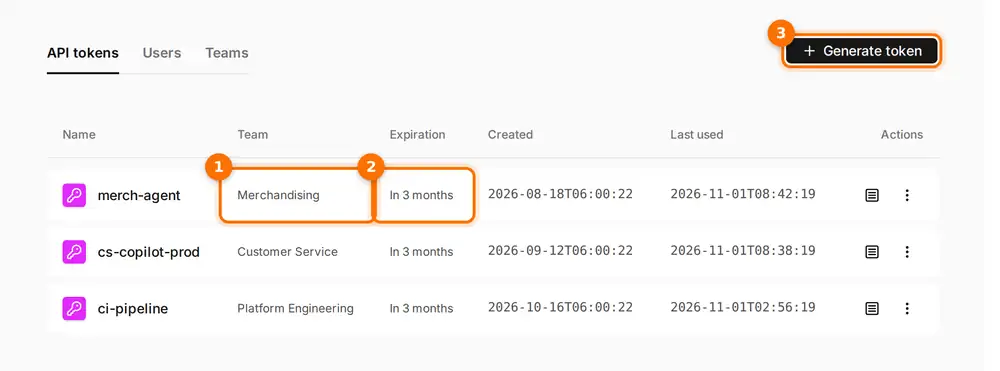
(1) Each token belongs to a team. (2) Each one expires. (3) Generate token issues a new one.
Six limits on a token
Every token starts with a team and an expiry. In the token form, the expiry is required, with a choice of 7, 30, 60, 90 or 365 days. On top of that, you can narrow it in six ways:
- Permissions. Choose "All available" to inherit the permissions of the person creating the token, or pick specific permissions.
- Server. Limit the token to one virtual server. A token for the Customer Service Copilot then works on that endpoint and nowhere else.
- Network. List the IP ranges, in CIDR format, that the token may be used from.
- Volume. Cap requests per hour and per day.
- Hours. Allow use only between a start and end time, in a time zone you choose.
- Days. Allow use only on chosen days of the week.
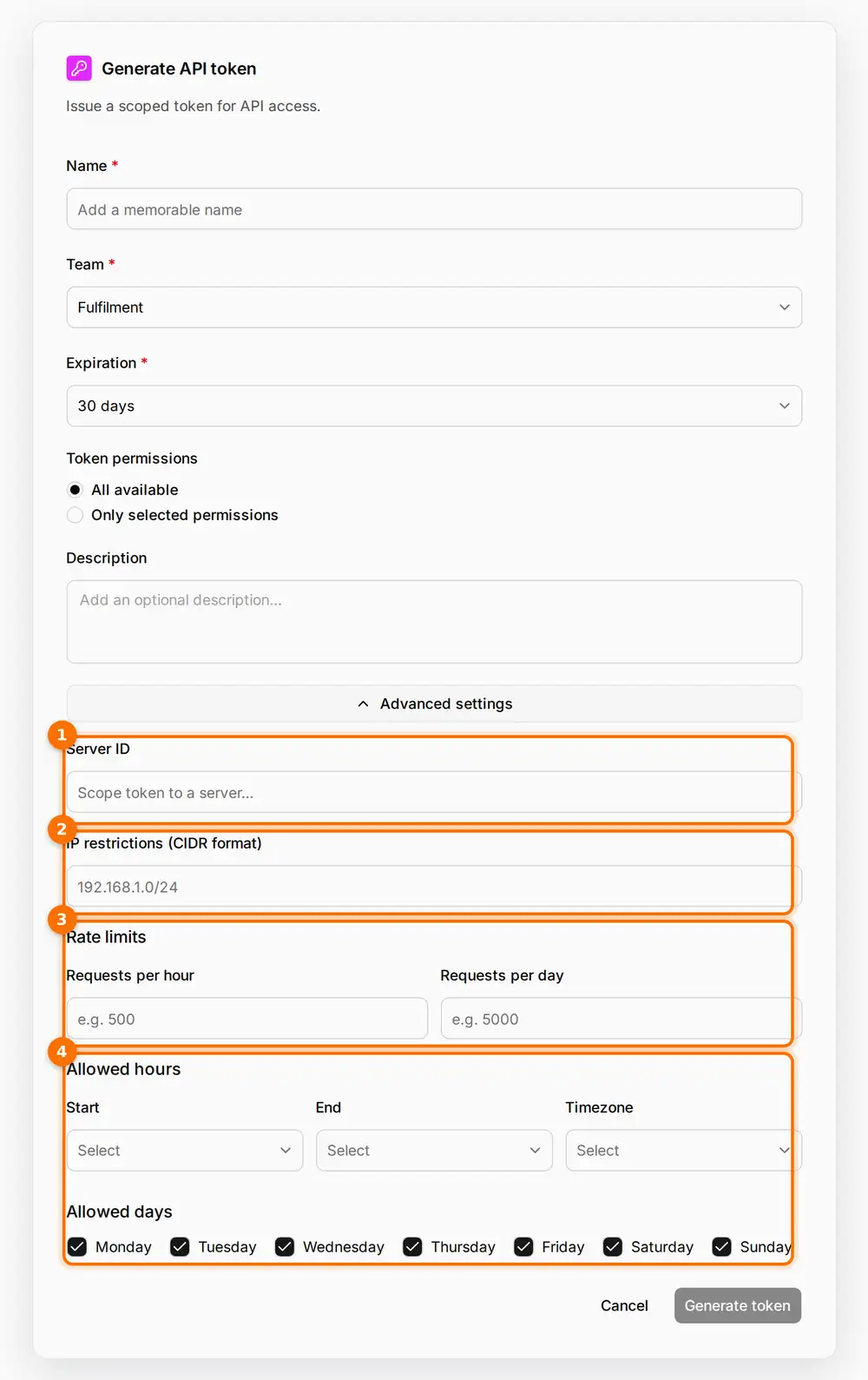
(1) Scope the token to one virtual server. (2) Restrict the IP ranges it can be used from. (3) Cap requests per hour and per day. (4) Allow it only in set hours and on set days.
What the gateway checks on every request
The limits are enforced by the gateway on each request, not just when the token is issued:
| Check | If it fails |
|---|---|
| The token is valid, has not expired and has not been revoked | Refused |
| The person behind it still belongs to the token's team | Refused: the token stops working when they leave the team |
| The request is for the token's virtual server, if it has one | Refused (403) |
| The caller's IP is inside an allowed range, if any are set | Refused (403) |
| The request falls within the allowed hours and days, if set | Refused (403): "Request not allowed at this time by token restrictions" |
| The request needs only permissions the token holds | Refused (403) |
| The hourly and daily caps have not been reached | Refused (429): usage limit exceeded |
By default the gateway also rejects any token that has no expiry claim at all.
Suggested settings by type of caller
These are our suggested starting points, not product defaults. Adjust them to your own risk and traffic.
| Caller | Server | Network | Volume | Hours and days | Expiry |
|---|---|---|---|---|---|
| Nightly agent | Its own virtual server | Your job runners' range | Per-day cap sized to one run | The run window only | 30 to 90 days |
| Copilot in a desktop app | Its team's virtual server | Your office and VPN ranges | Per-hour cap | Working hours, if the team keeps them | 30 to 90 days |
| CI pipeline | A test virtual server | Your CI runners' range | Per-hour cap | No limit | 7 to 30 days |
A token checklist
- Issue one token per agent or pipeline, named after what it does.
- Issue every token to the team that owns the caller.
- Scope each token to one virtual server.
- Add network, volume and time limits that match how the caller really runs.
- Pick the shortest expiry you can rotate comfortably.
- Revoke a token as soon as its caller is retired.
Open the interactive demo and go to Settings, then API tokens, then Generate token, to see every option described here.