
2 November 2026
MCP Connect and IBM Instana: what's possible
Instana as an observability source for AI assistants, governed by MCP Connect, and Instana watching the gateway itself. What each team can ask, how to connect Instana once, and how to keep its reach in proportion.
By MCP Connect

Two products, two directions
IBM Instana already knows a great deal about your estate: which applications and services are running, how websites and mobile apps behave for real users, what infrastructure sits underneath, which releases went out and whether your SLOs are holding. MCP Connect decides which AI assistants can reach which systems, and records what they do.
Put the two together and there are two directions to work in. AI assistants can use Instana as a source of observability context, through the gateway. And Instana can watch the gateway itself, so the AI traffic through MCP Connect is as visible as the rest of your applications. This article covers both, using the MCP Connect example environment.
What Instana brings to an assistant
Instana publishes its own MCP server, mcp-instana. It wraps Instana's public REST APIs and turns conversational questions into API calls. It publishes 11 tools, each covering one area of Instana:
| Tool | Area of Instana |
|---|---|
manage_applications | Applications, services and endpoints |
manage_websites | Website monitoring for real users |
manage_mobile_apps | Mobile app monitoring |
manage_infrastructure | Hosts, containers and the rest of the infrastructure |
manage_events | Events and incidents |
manage_releases | Release markers |
manage_slo | Service level objectives |
manage_synthetics | Synthetic tests |
manage_maintenance_windows | Maintenance windows |
manage_custom_dashboards | Custom dashboards |
manage_automation | Automation actions |
That is a lot of reach for one assistant. It is also the reason to put a gateway in front of it.
Connecting Instana once
IBM Instana is in the MCP Connect server catalog, under Observability. The Instana MCP server is self-hosted: you run it next to the gateway, for example with uvx mcp-instana --transport streamable-http, and point the catalog entry at its endpoint.
The gateway then sends two custom headers on every call: instana-base-url, for your Instana tenant, and instana-api-token. They are stored with the registration on the gateway. Engineers connect their AI clients to a virtual server with a scoped MCP Connect token; the Instana API token never leaves the gateway.
Once the server is registered, MCP Connect discovers the 11 tools and their input schemas, so nobody configures them by hand.
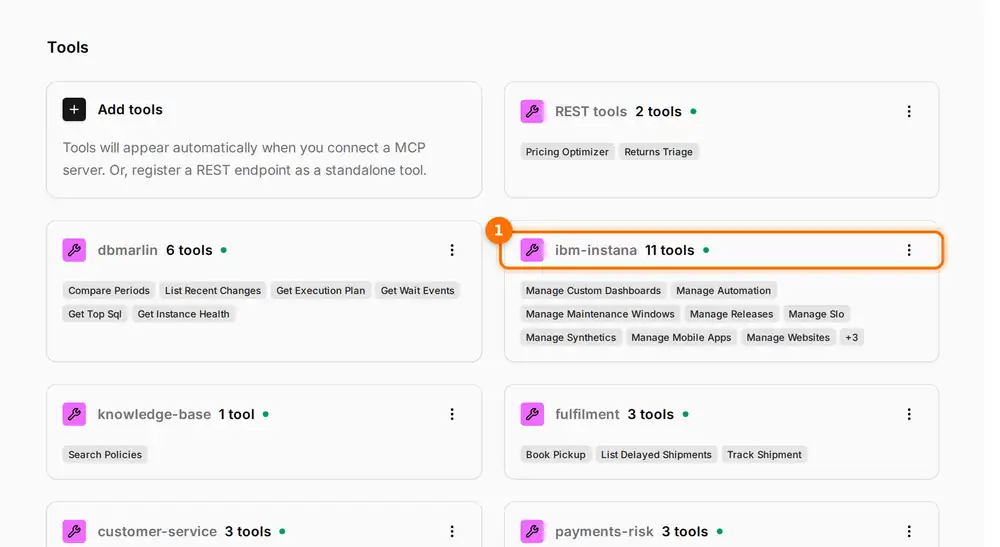
(1) IBM Instana's 11 tools, discovered from its MCP server and grouped under it on the Tools page.
What's possible
With Instana behind the gateway, different teams can ask different questions of the same Instana tenant, each through their own virtual server.
| Who | Asks | Tools |
|---|---|---|
| On-call engineer | Which services are affected, and what changed before it started? | manage_events, manage_applications, manage_releases |
| Release manager | Did last night's release move error rates or latency? | manage_releases, manage_applications |
| Digital team | Are checkout pages slow for real users, and do the synthetic tests agree? | manage_websites, manage_mobile_apps, manage_synthetics |
| Service owner | Is the checkout-availability SLO burning, and how much error budget is left? | manage_slo |
| Platform team | Put the payments hosts into a maintenance window during tonight's patching | manage_maintenance_windows, manage_infrastructure |
| Leadership briefing | Give me a one-paragraph summary of service health this week | manage_slo, manage_events |
Instana gets more useful still next to the systems around it. In the example environment, the SRE Copilot pairs Instana with DBmarlin, so one assistant follows a slow endpoint down to the query behind it. Read how the SRE Copilot works.
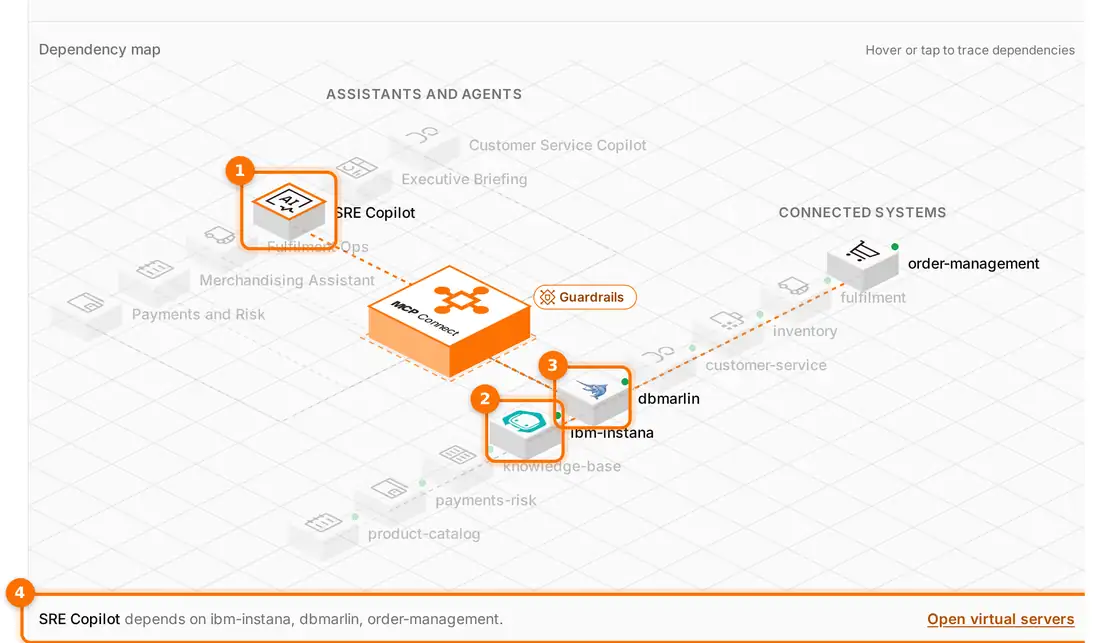
(1) The SRE Copilot is selected on the dependency map. (2) IBM Instana and (3) DBmarlin light up as its dependencies. (4) The details line names all three systems it depends on: ibm-instana, dbmarlin and order-management.
ServiceNow is in the catalog too. With Instana and ServiceNow in the same virtual server, an assistant can read an Instana event and raise or update the matching incident, if your ServiceNow MCP server publishes the tools for it.
Keeping Instana's reach in proportion
Tools such as manage_maintenance_windows, manage_custom_dashboards and manage_automation are named for managing Instana, not only reading from it. Three controls keep that in proportion:
- Bundles decide which areas an assistant can touch. A leadership briefing needs
manage_sloandmanage_events, not automation. Each virtual server carries only the Instana tools its use case needs. - The Instana API token decides what the tools can do. Instana API tokens carry their own permissions. Give the token on the gateway only the permissions your assistants should have.
- Guardrails check every call. Plugins on the gateway run before and after each Instana call: rate limits, argument checks, and PII masking on results. Every call lands in the activity feed, with the virtual server it came through.
Instana watching the gateway
The other direction matters as much. MCP Connect is instrumented with OpenTelemetry, so its traces can go to Instana with the rest of your telemetry. It also runs under Instana's AutoTrace for Python, including Instana Python packages older than 3.12, and its spans join the surrounding Instana traces rather than starting new ones.
That puts the AI layer on the same map as everything else. When an assistant's answer is slow, you can see whether the time went in the gateway, in a plugin or in the connected system behind it, in the tool your operations team already uses.
Getting started
- Run the Instana MCP server next to MCP Connect, and add IBM Instana from the server catalog.
- Set the
instana-base-urlandinstana-api-tokenheaders on the registration, using a token with only the permissions you need. - Give Instana an owning team and the narrowest visibility that works.
- Build one virtual server per use case, holding only the Instana tools it needs.
- Point the gateway's telemetry at Instana, so the AI layer is observed like any other service.
Open the interactive demo, open the Server catalog and filter by Observability to find IBM Instana, then select the SRE Copilot on the dependency map.